

How To Use Telegram Without Phone Number in 2024: A Step-by-Step Guide
Telegram is one of the most popular messaging platforms today, and while it usually requires a phone number for account creation, there are ways to bypass this. In this article, we’ll explore how to use Telegram without providing your personal phone number, keeping your privacy intact. Follow these simple steps to learn how to use Telegram without a phone number in 2024.
Why Use Telegram Without a Phone Number?
For many, privacy is a top priority, and sharing a personal phone number on public platforms like Telegram might feel intrusive. By using an alternative method, you can create an account without revealing your personal details. This method also proves useful if you need an additional Telegram account for work or other purposes but don’t want to associate it with your primary number.
Steps To know How to use Telegram without Phone Number
To use Telegram without a phone number, you need to follow these steps carefully. We’ll walk you through the entire process.
1. Search for Temporary Number Providers
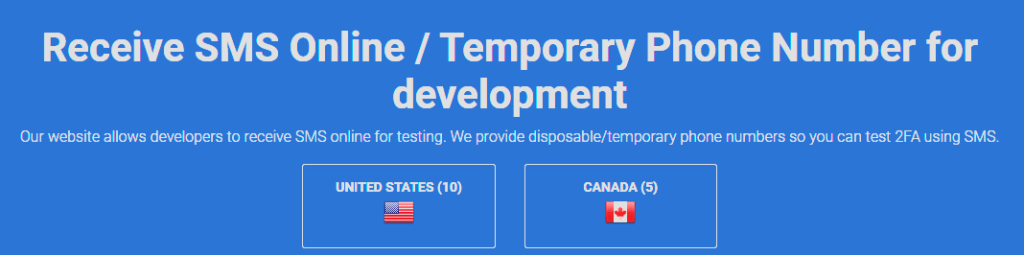
To get started, the first thing you need to do is search for a service that provides temporary or disposable numbers. These numbers can be used to receive verification codes (OTP) required by Telegram. The easiest way to find such a service is by heading to Google and searching for “Receive SMS online”.
There are several websites that offer these services for free or for a small fee. Some popular options include:
2. Select a Fake Number
Once you’ve found a reliable temporary number provider, select a phone number from the available options. These services typically offer numbers from different countries, such as the United States, Canada, and the United Kingdom.

Make sure to pick a number that is currently active and hasn’t been used too many times, as this can affect whether or not the Telegram verification process will succeed.
3. Enter the Temporary Number in Telegram
Now that you have a temporary number, open the Telegram app on your device. When prompted to enter your phone number, paste the number you copied from the website.
Click on Continue to proceed. Telegram will then send a One-Time Password (OTP) to the number you entered.
4. Retrieve the OTP from the Website
To receive the OTP, go back to the temporary number provider website. Scroll through the list of received messages associated with the number you selected. You should find the OTP that Telegram has sent to complete the verification process. This usually appears as a string of numbers.
For example, you might see something like this:
- OTP: 22395
5. Enter the OTP in Telegram
Go back to the Telegram app and enter the OTP in the required field. After entering the correct code, click Continue. If the code is correct, your account will be verified, and you’ll be able to use Telegram without associating it with your real phone number.
6. Start Using Telegram
Once the verification process is completed, you can start using Telegram just like any other user. You’ll be able to send and receive messages, join groups, and use all of Telegram’s features without sharing your actual phone number.
Pros and Cons of Using a Temporary Number
While using a temporary number to set up Telegram can be convenient, it also has its downsides. Below are some of the advantages and disadvantages of using this method.
Pros:
- Enhanced Privacy: You don’t need to reveal your real phone number.
- Convenience: You can set up multiple accounts for different purposes.
- Accessibility: Most services offering temporary numbers are free.
Cons:
- Limited Duration: Some temporary numbers may only be valid for a short period.
- Potential Verification Issues: If the number has been used too many times, Telegram might block it.
- Security Risks: Temporary numbers are often shared among multiple users, posing potential privacy risks.
Alternative Methods to Use Telegram Without a Phone Number
If using a temporary number doesn’t suit you, there are other methods you can explore to create a Telegram account without using your personal phone number.
1. Use Google Voice or TextNow
Services like Google Voice and TextNow provide free virtual phone numbers that can receive SMS messages. These numbers can be used to sign up for Telegram, just like a regular phone number.
2. Use a Landline Number
Believe it or not, you can also register a Telegram account using a landline phone. During the verification process, instead of receiving an SMS, you will get a call with the OTP.
